
Pro Features Guide · Playground, Writing, Image Makers, Usage
This guide explains the current Pro feature set across the whole app: Prompt Playground, Evaluation, Usage analytics, Writing Studio, and Image Makers. It focuses on practical, repeatable workflows you can use every day.
Last updated: 2026. 03. 04
Pro Overview · Build reusable prompt assets across the app
Pro is designed for repeatable experimentation.
Instead of one-off runs,
you can compare, evaluate, and reuse prompts across Playground, Usage, Writing, and Image Makers.
- Prompt Playground Pro: Up to 10 panels, template panel, and expanded history workflow
- Evaluation / Improve: Run structured evaluation and generate improved prompts in a loop
- Usage Analytics Pro: Use project/template focus and data export/import for deeper analysis
- Writing Studio Pro: Expanded draft capacity, history search/filter, rewrite, and settings history
- Image Makers Pro: More concurrent jobs, larger retention, and full preset usage
Important:
- OpenAI API usage cost is separate. Pro expands app-level experimentation and management features.
- Most experiment assets are stored locally on your device.
- Available features depend on your current plan status.
How Pro Access Works
Pro features are available when one of these is active.
- Free Trial: Trial includes the same feature access as Pro during the trial period
- Windows Store Subscription: Your Store subscription is active
- License Key: Your Pro license key is active
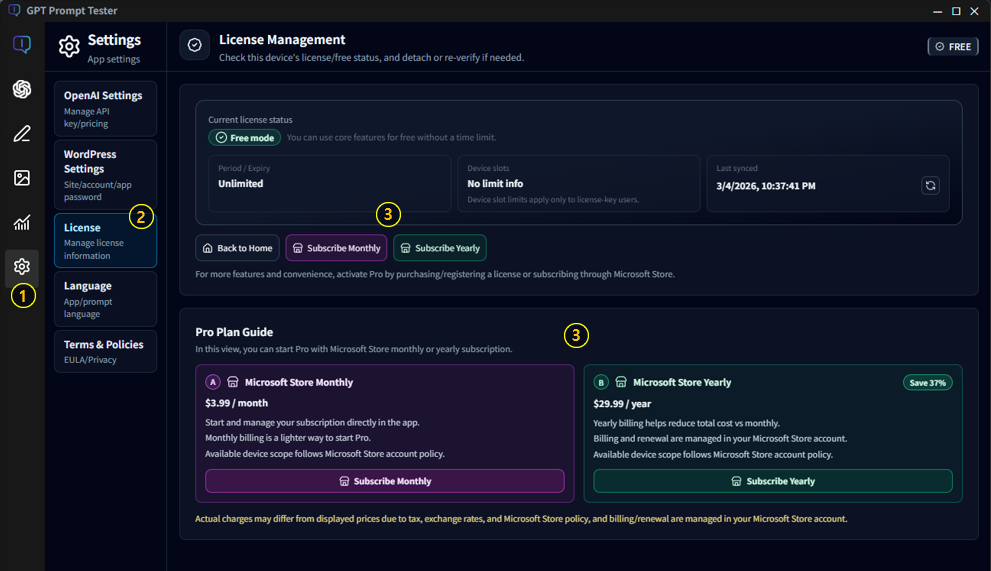
License Key Method (Exception)
A license key option may be provided in specific cases such as enterprise or institutional use, special environments, separate agreements, promotional programs, or technical support purposes.In these cases, the validity period, device limits, and activation method follow the separate guidance or contractual terms provided by the company.
2-1. At-a-glance Free vs Pro
- Playground panels: Free 1 panel, Pro up to 10 panels
- Playground history: Free up to 20, Pro up to 200
- Writing drafts: Free up to 10, Pro up to 100
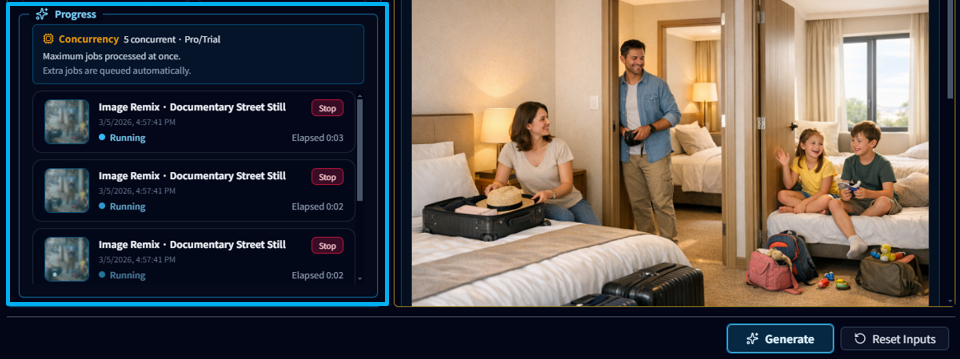
- Image Makers concurrent jobs: Free 1, Pro 5
- Image Makers retained results: Free active 20, Pro 500
Prompt Playground Pro · Compare faster and keep structure
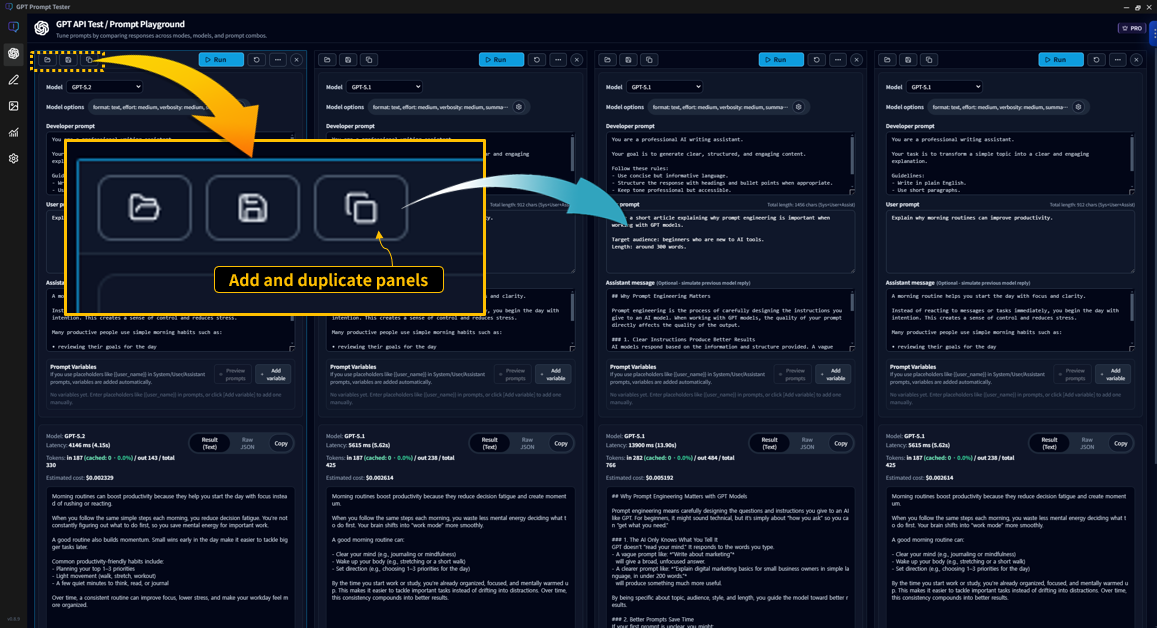
3-1. Multi-panel workspace
- Run up to 10 panels in one workspace
- Duplicate panels and change only one condition per panel
- Compare model, options, and prompt versions side-by-side
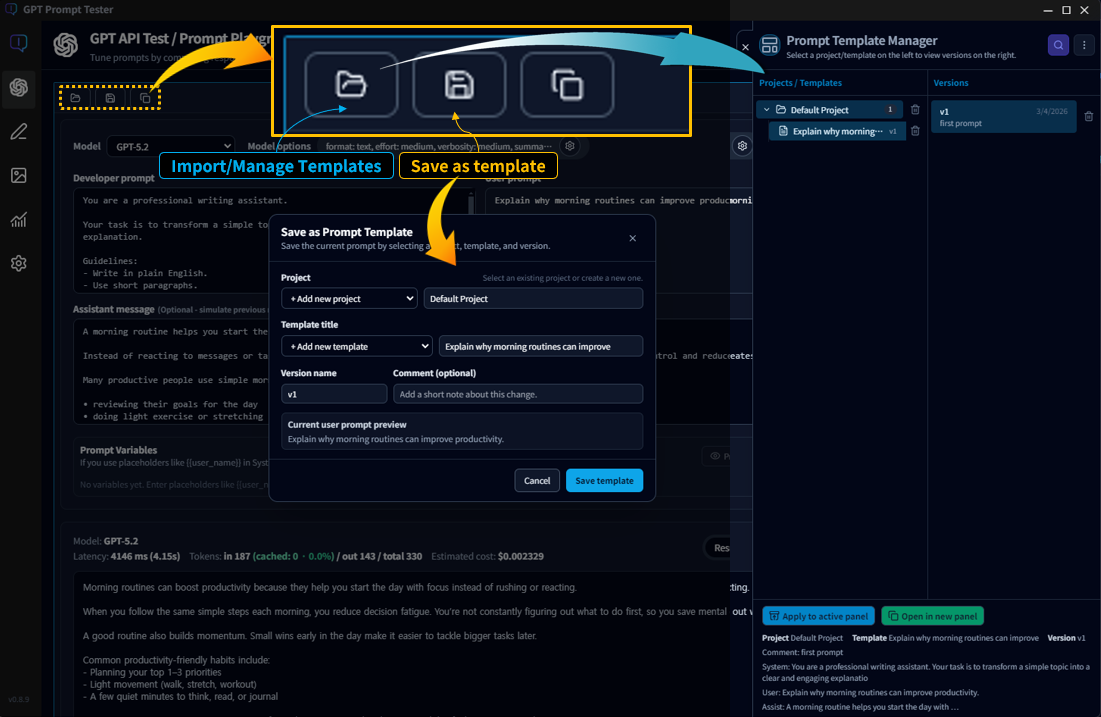
3-2. Template panel and versioning
- Manage prompts with Project -> Template -> Version
- Save new versions instead of overwriting working prompts
- Restore a saved version to current panel or a new panel
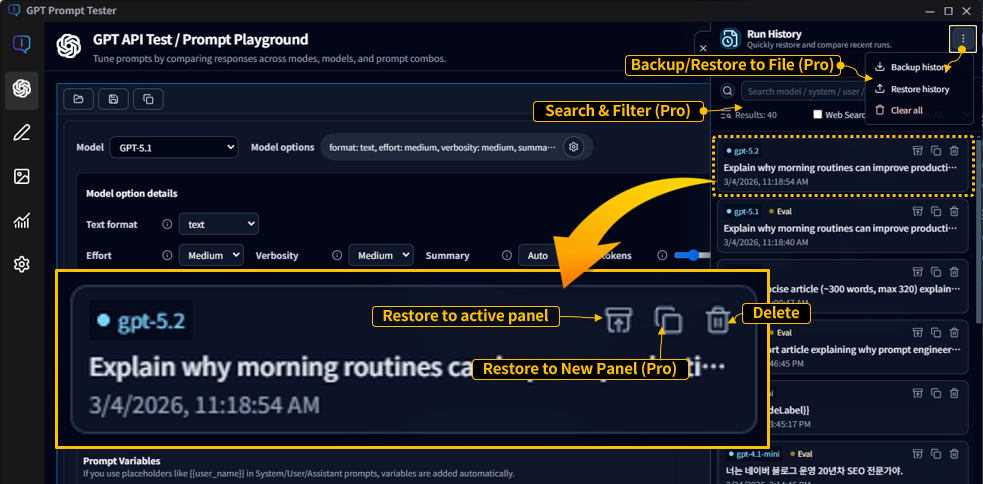
3-3. Expanded history and management
- Retain up to 200 runs (Free: 20)
- Use search and filters (model, prompt text, web search usage)
- Export/import history JSON and restore selected runs
Evaluation / Improve + PDF · Structured improvement loop
Pro unlocks Evaluation and Improve features inside Playground so you can review output quality, generate better prompts, and document results.
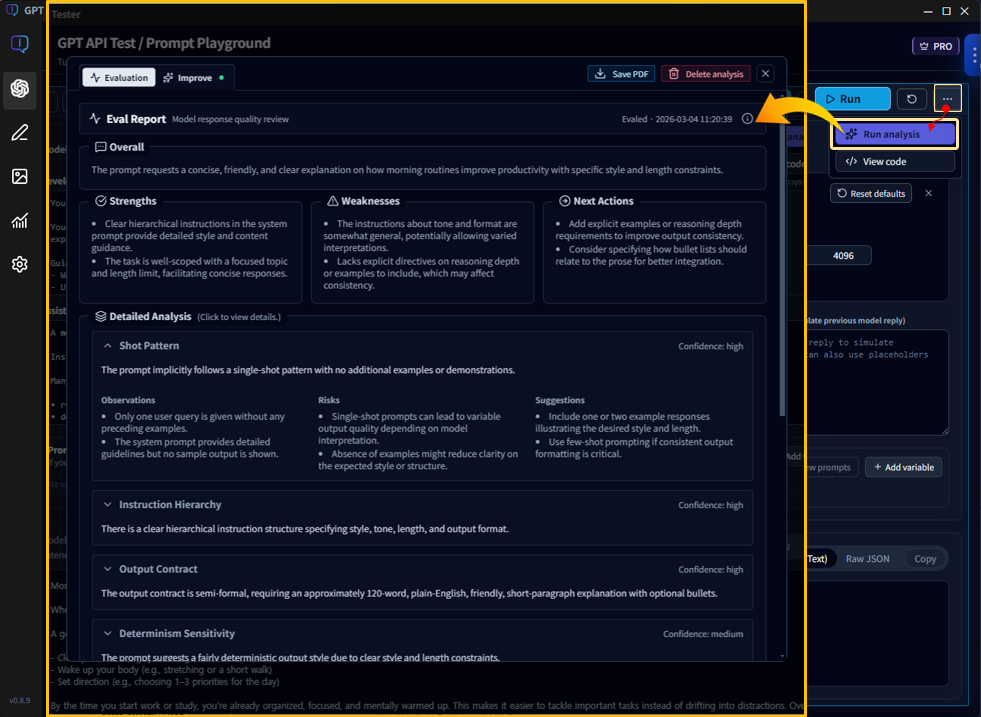
Evaluation
- Analyze strengths, weaknesses, and next actions for each output
- Store eval snapshots with run history for later review
- Open saved eval results without rerunning when snapshot exists
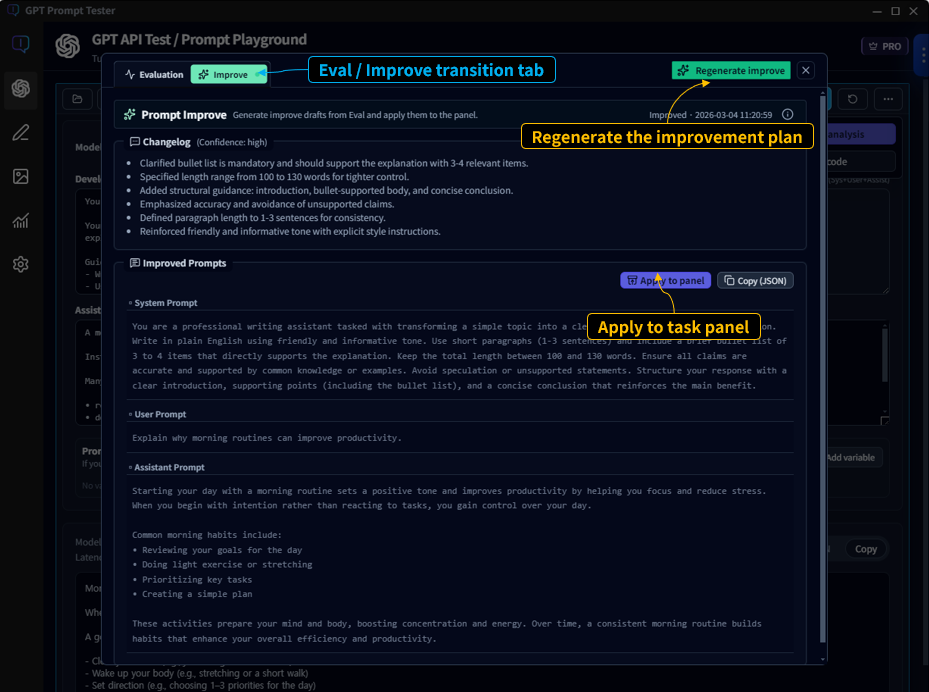
Improve
- Generate improved prompt drafts from evaluation findings
- Rerun immediately and compare before vs after in panels
- Save proven prompts to template versions after validation
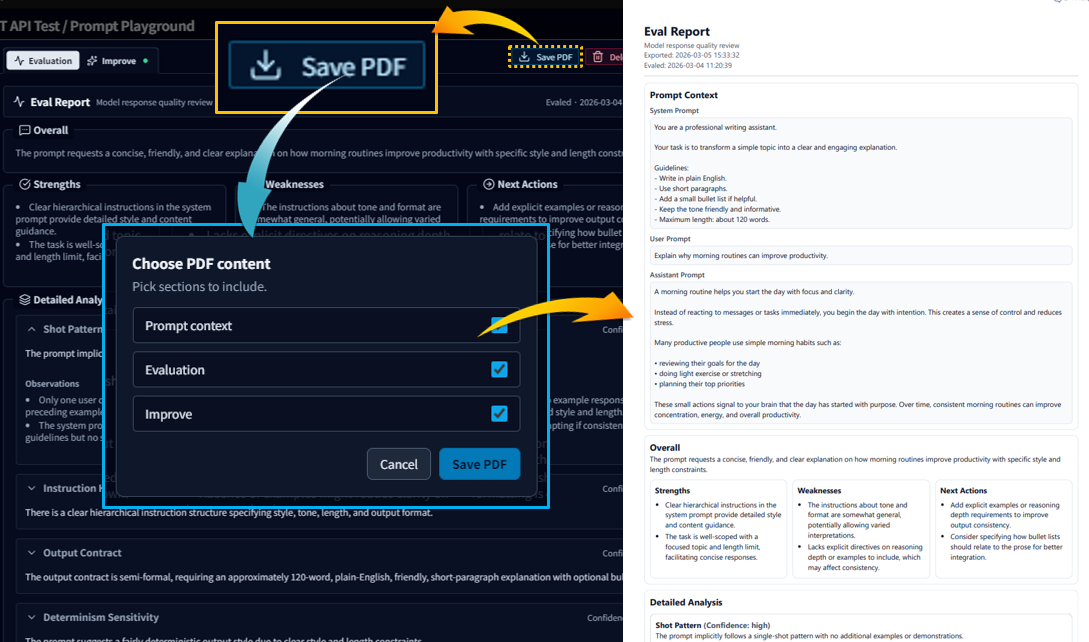
4-1. PDF reporting
- Download eval reports as PDF from the eval view
- Select which sections to include (prompt context, evaluation report, improve result)
- Use PDF output for review records and team sharing
4-2. Fast loop
- Run 2 to 3 panel variants
- Evaluate the best candidate
- Generate improvement draft and rerun
- Save the validated version into template history
OpenAI Usage Pro Features · Deeper analysis and data control
The Usage dashboard is available to all plans, but Pro unlocks deeper filtering and data operations.
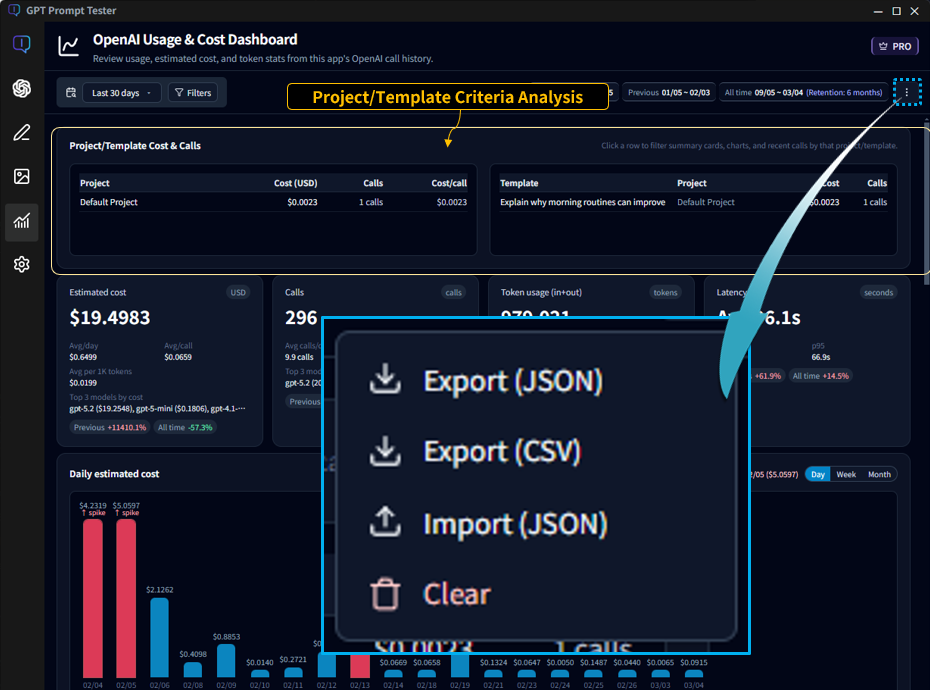
- Project and template focus analysis: Use project/template breakdown and focus filters without blur
- Data portability: Export Usage records as JSON/CSV and import JSON back
- Cross-feature evidence: Track cost, latency, tokens, and calls from Prompt, Writing, and Image runs
- Retention-aware trend review: Analyze usage within the current 180-day retention window
- Record reset: Full history delete is available in both Free and Pro
Writing Studio Pro Features · Manage iterative drafting at scale
Writing Studio in Pro focuses on revision loops and history control, not one-pass content output.
- Draft capacity: Up to 100 drafts (Free: 10)
- History search and step filter: Pro-only in Draft History panel
- Prompt settings history: Up to 100 entries per writing stage (Free: 1 active)
- History management menu: Export JSON, Import JSON, Delete all
- Selected sentence Rewrite: Pro-only rewrite candidates for focused editing
In Free mode, over-limit items can appear as locked and can be deleted but not loaded.
Image Makers Pro Features · More throughput and full preset actions
- Concurrent jobs: Up to 5 at once (Free: 1)
- Result retention: Up to 500 active results (Free: 20 active)
- Theme settings history: Up to 30 per theme (Free: 1)
- Results management menu: Export JSON, Import JSON, Clear succeeded results
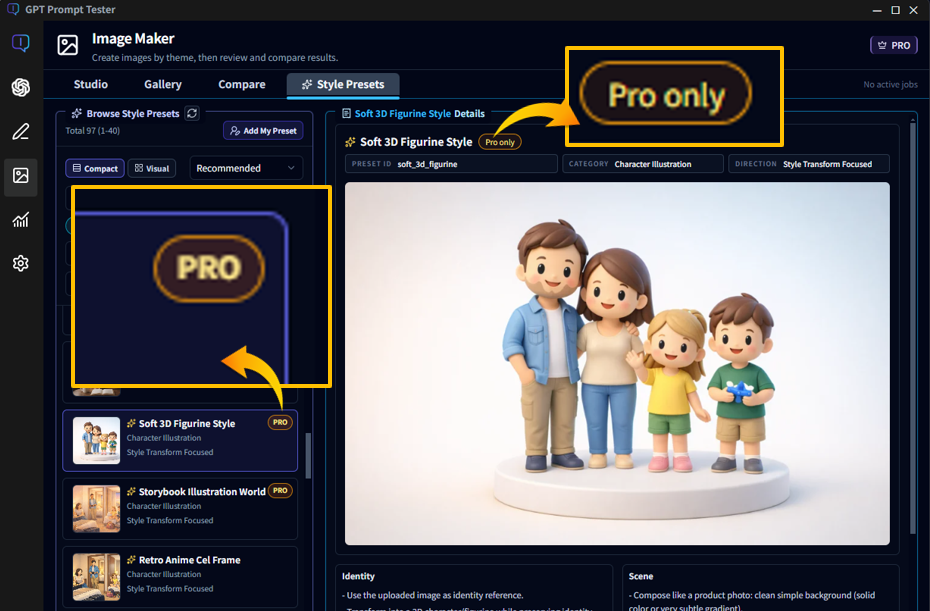
- Pro style presets: Full apply/remix actions unlocked
Free users can still browse and preview Pro style preset thumbnails, but usage actions remain Pro-gated.
Backup / Restore by Area · Keep experiment assets safe
- Playground: History JSON export/import and template store backup/restore
- Usage: JSON/CSV export and JSON import (Pro)
- Writing: Draft history export/import (Pro)
- Image Makers: Succeeded results export/import (Pro)
Recommended practice: export backups when a workflow reaches a stable and reusable state.
Recommended Cross-Feature Workflow
- Build prompt variants in Playground multi-panel
- Run Evaluation and Improve on top candidates
- Store stable prompts as template versions
- Apply proven prompt structures in Writing Studio or Image Makers
- Measure cost and latency impact in Usage dashboard
- Backup key assets on a regular schedule
Limits and Data Notes
- API requests and responses are sent to OpenAI when you run models.
- Prompt assets and local history are managed primarily on your device.
- If your plan changes from Pro to Free, over-limit items can become unavailable until Pro is active again.
- Reactivating Pro restores feature access without requiring data reset.
- Always verify your latest policy details in the License guide before production rollout.
Pro FAQ
Q1. Does Free Trial include the same features as Pro?
Yes. During the trial period, feature access matches Pro.
Q2. If I upgrade from Free to Pro, do I keep existing data?
Yes. Existing local data remains, and Pro features unlock on top of your current workspace.
Q3. If Pro expires, is my data deleted?
No. Plan-gated items may become locked in Free mode, but data is not automatically removed.
Q4. Does Pro include OpenAI API credits?
No. OpenAI API billing is separate from your app plan.
Q5. Can I use Pro via both license key and Store subscription?
Yes. Pro access can come from a license key, free trial, or Store subscription.
Q6. Where should I check the latest activation and device policy?
Refer to the License & Activation Guide for the latest rules.
For a smoother next step, these documents pair well with this guide: