
From prompt experiments to optimization,
all in one workspace
GPT Prompt Tester is a professional Playground designed for building GPT API–based services or creating content— helping you experiment, compare, and tune prompts quickly and systematically.
The Core Workspace Optimized for GPT API Testing
Build System / User / Assistant prompts in a single view, and instantly check responses, tokens, and estimated cost right after each run.
- Three-layer prompt structure (System / User / Assistant)
- Model & option summary at the top, response/tokens/cost at the bottom—everything in one place
- Quickly test multiple prompt candidates before applying them to production
Model options, Web Search, and Reasoning—together
Configure core options like Temperature, Top P, and Max Tokens, plus Web Search and GPT-5 Reasoning options—directly inside Playground.
- Select response format (Text / JSON) and use JSON-mode safeguards
- Adjust Temperature · Top P · Max Tokens with intuitive sliders
- Enable Web Search and configure domain / country / context size
- Support for GPT-5 Reasoning options (effort, verbosity, summary)
※ Image Generation, document understanding (PDF, etc.), and code-analysis tools will be integrated progressively.
Restore past experiments in one click
Every run automatically saves your prompts and settings. Click any previous record to restore the exact panel state instantly. This dramatically improves efficiency when iterating on prompts.
- Automatic execution history
- Full panel-state restore with a single click
- Especially useful for repeated prompt-tuning workflows
FREE and PRO differ in storage limits and available features. PRO provides larger capacity and more convenient history tools.
Treat prompts like assets—with projects, templates, and versions
Save frequently used prompts using a Project → Template → Version structure. Each version is managed as a complete snapshot—including model, options, and variables— optimized for iterating and upgrading production prompts over time.
- 3-level structure: Project > Template > Version
- Save full-state snapshots including model, options, and variables
- Track history by version notes and created dates
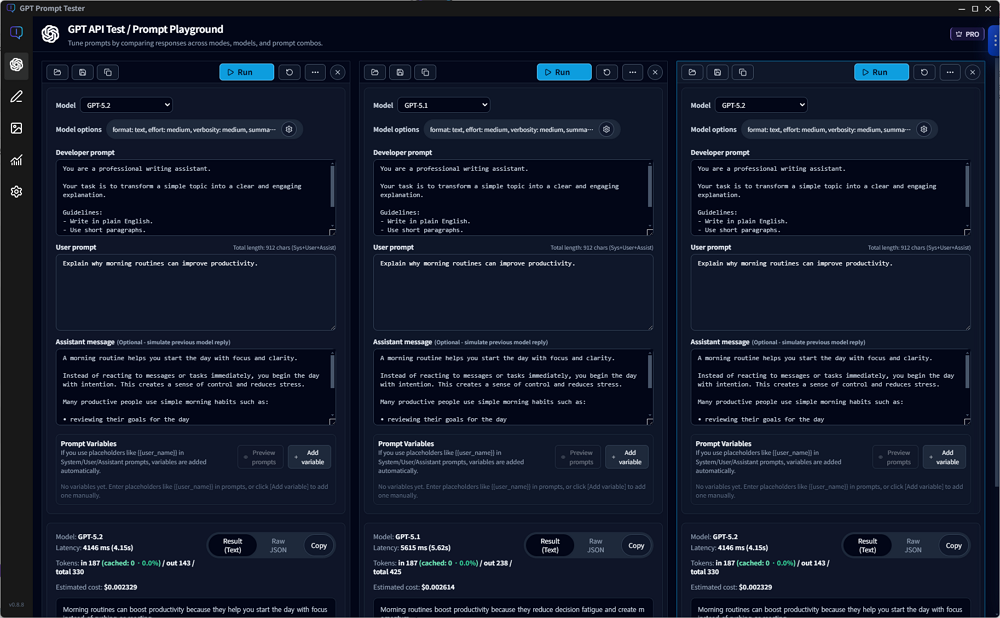
Compare results side by side with multiple panels
Open multiple panels in one screen and configure different prompts, models, and options per panel. Run them independently and compare results in parallel—PRO only.
- Clone the current panel to create alternatives instantly
- Run panels independently and compare results in a horizontal layout
- Great for reviewing blog drafts, sales copy, and system-message candidates
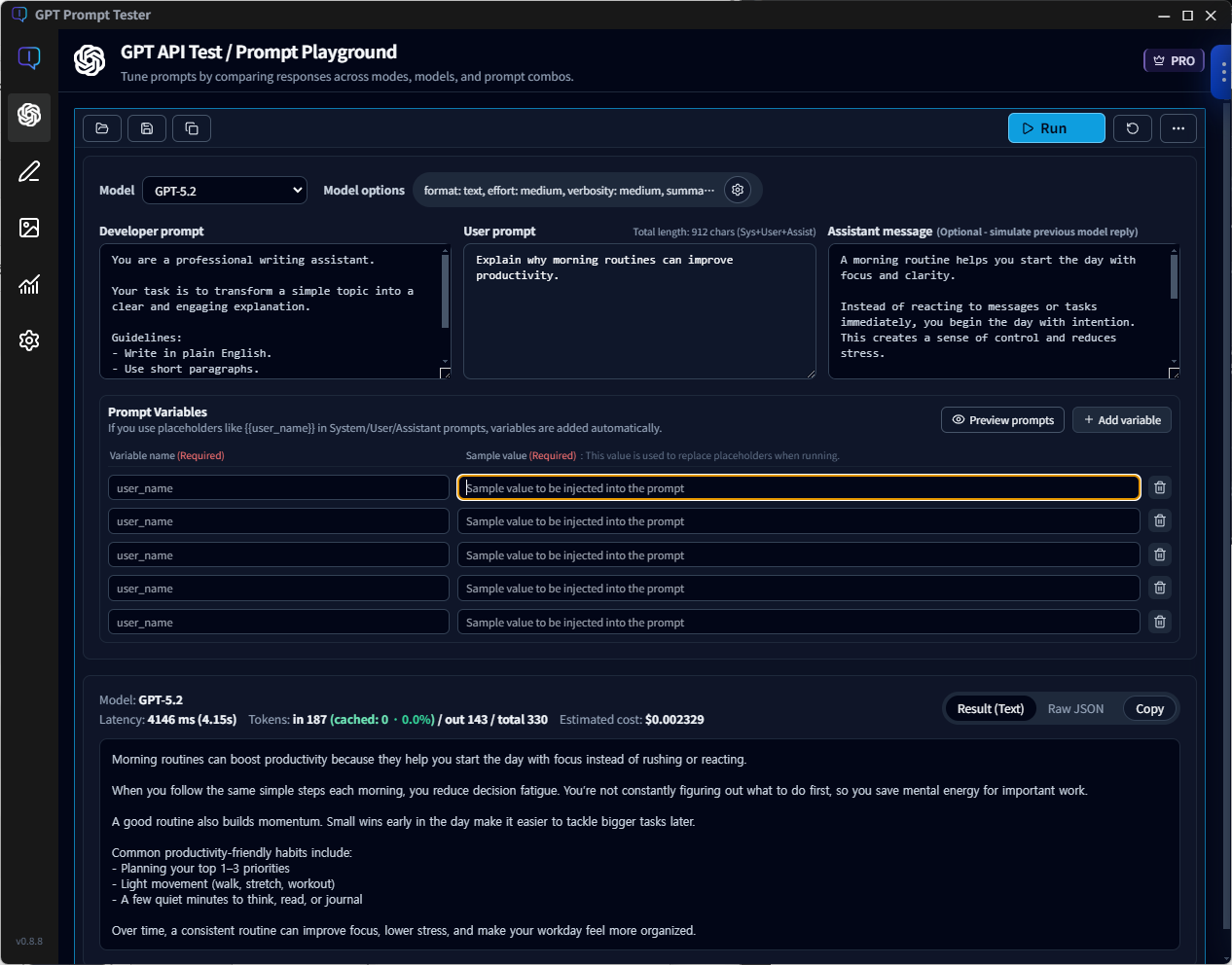
Placeholder-based variables & sample prompt preview
Use placeholders like {{user_name}} or {{product_name}} inside prompts,
and GPT Prompt Tester automatically generates a variable list.
Insert test values to validate responses in a production-like setup.
- Auto-detect
{{placeholder}}→ add to variable list - Renaming a variable updates sample values and the full prompt automatically
- Preview System / User / Assistant prompts with sample values applied
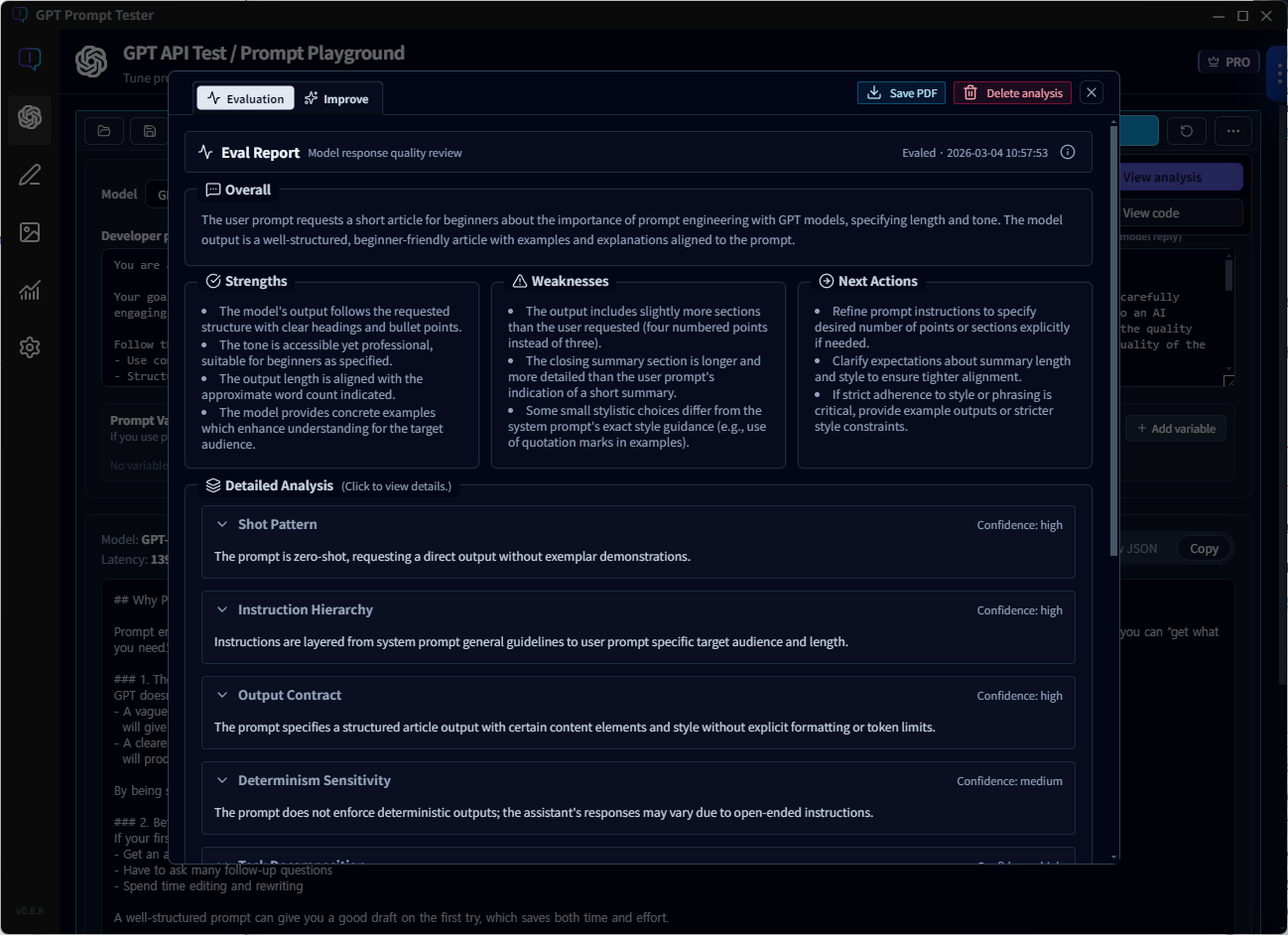
Improve prompts with evaluation—not guesswork
Analyze results and summarize strengths, weaknesses, and next actions, then generate improved prompts you can apply immediately.
- Eval: Diagnose outputs through structure, instruction hierarchy, and output contracts
- Improve: Auto-generate improved prompts based on evaluation and compare outcomes
- Apply instantly: One click to bring the improved version into your workflow
Writing Studio — turn prompt experiments into publish-ready writing
Start with a topic, and follow a single flow: Title suggestions → Draft generation → WordPress publishing.
Writing Studio usage is also automatically counted in the Usage Dashboard, so you can filter cost, tokens, and call volume by project, model, and tool.
Image Maker — complete your writing flow with images
Don’t stop at “generate once.” Image Maker provides a single workflow: Generate → Organize → Compare → Refine. Quickly iterate on blog section images, thumbnails, backgrounds, and style transformations in one place.
- Theme-based generation: Remix / Custom / Section Image / Abstract Background
- Result management: Organize successful outputs and iterate quickly with re-runs
- Comparison-first workflow: Side-by-side slider + clear prompt/setting diffs for fast decisions
- Local storage: Generated images and logs are saved to your PC locally
An OpenAI dashboard for cost, calls, and token usage—at a glance
GPT Prompt Tester automatically logs every Playground run locally and visualizes cost and token usage over time in the dashboard. Check estimated cost instantly for the last 7/30 days—or any selected date range.
- Filter bar for time range, project, model, and mode (web_search, etc.)
- Summary cards for estimated cost, calls, tokens, and average latency
- Daily cost graph to detect spikes and patterns quickly
- Compare with the previous period to see changes in cost, calls, and tokens
All usage data is stored locally on your PC and is not sent to any external server—including the license server.
Break down cost by model and tool—plus performance trends
See which models consume the most budget, how web_search impacts cost and performance, and when calls spike—all inside the dashboard.
- Compare average cost per 1K tokens, average latency, and average output tokens by model
- Tool-level cost breakdown (standard calls / web_search / image_generation, etc.)
- Track budget burn rate using cumulative cost charts and previous-period pace comparisons
- Detect response delays quickly with latency trends (daily/weekly/monthly)
- Analyze real usage patterns with time-of-day/day-of-week views and detailed call lists
The free plan includes recent usage and basic stats. PRO unlocks longer retention and deeper analytics.
Start using GPT Prompt Tester today
Even the free version includes most of what you need for prompt experimentation and tuning.
If you need powerful multi-panel workflows and prompt template management, upgrade to PRO.