
Hello,
This is GPT Prompt Tester.
In this v1.0.2 update, a new panel comparison feature has been added to GPT Playground.
Now, instead of simply placing multiple panels side by side, you can directly compare differences in prompts, variables, model/options, results, and key metrics all in one screen.
This version also improves title suggestions and draft generation quality in Writing Studio, refines the Eval result review and PDF export flow, and improves the accuracy of OpenAI usage cost calculations.
Highlights of This Update
- Added panel comparison to GPT Playground
- Improved title suggestions and draft generation quality in Writing Studio
- Improved Eval result review and PDF export flow
- Refined OpenAI usage cost calculation
1. Added Panel Comparison View
The biggest change in this version is the new Compare View feature.
Previously, you could place multiple panels side by side and check each execution result separately, but it was still up to you to read through them and figure out what had changed.
Now, when you select panels to compare, the comparison area at the top lets you review the following at a glance:
- Summary of what changed
- Model/option differences
- Variable differences
- Prompt differences
- Result differences
- Key metric comparisons such as response time, tokens, and cost
The selected panels are also organized into Baseline and Compare roles, making it much clearer which result is being used as the reference.
Panel UI Changes Related to the Comparison Feature
With the addition of the comparison feature, a new panel title bar (①) has been added.
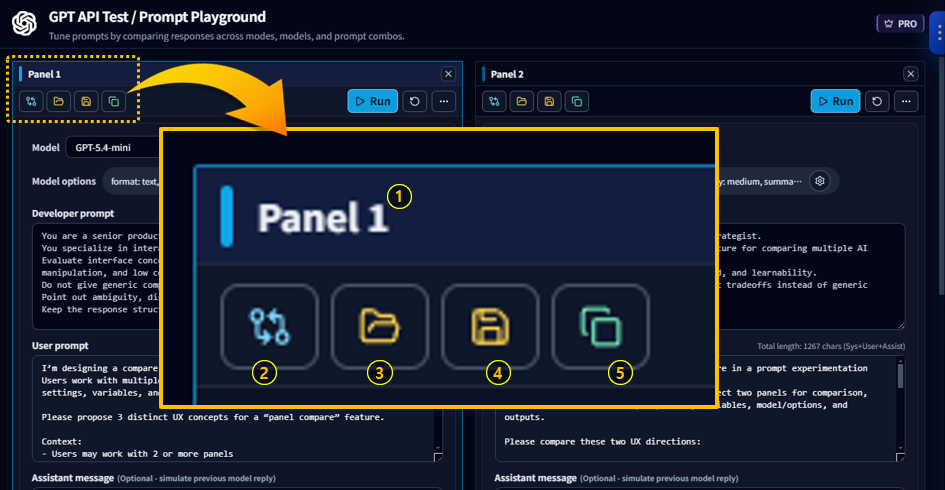
When there are at least two panels available for comparison, the compare button (②) appears.
The UI for Load Template (③), Save as Template (④), and Create/Duplicate Panel (⑤) has also been refined to make each action clearer.
When you click the compare button (②), the comparison view appears at the top of the panel area.
The first panel added to comparison becomes the Baseline.
At this point, you can drag the split bar to adjust the height of the top and bottom areas.
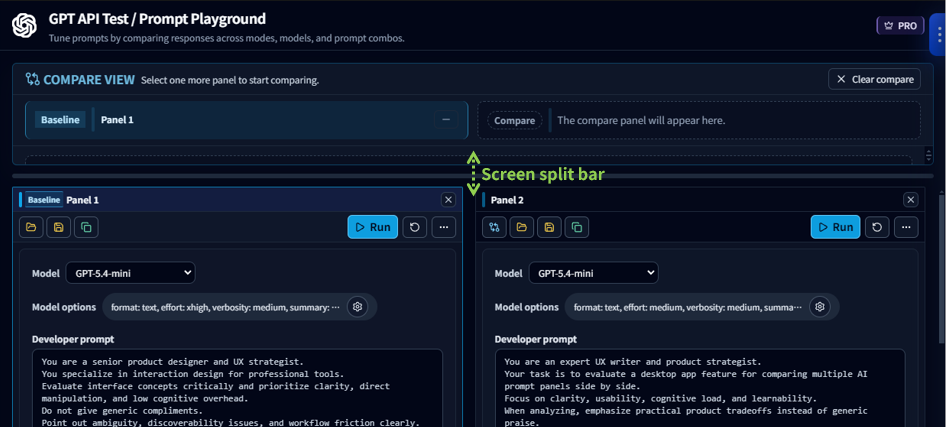
When you click the compare button on a second panel, that panel is added as Compare, making it much easier to review the execution differences between the two panels.
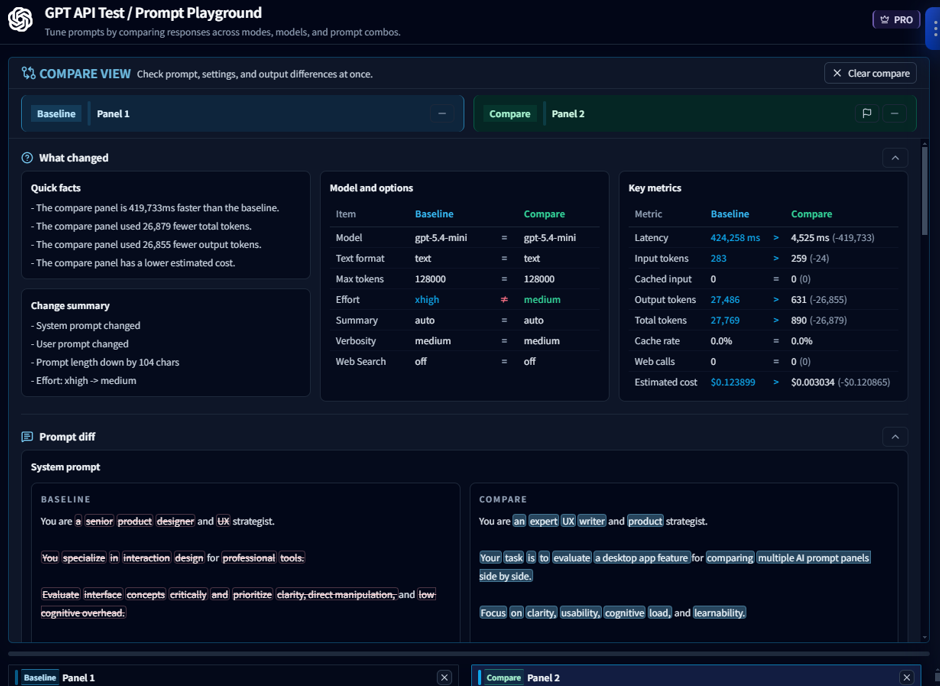
You can also directly see which parts of the prompt have changed.
With this update, multi-panel is no longer just a way to open several panels at once.
It has become much closer to a true comparison workspace for reviewing and judging prompt experiment results.
2. Writing Studio Quality Improvements
Writing Studio has also been improved with a focus on output quality and stability.
Better Title Suggestions
- Adjusted to recommend shorter, more natural blog-style titles
- Reduced cases where one title tried to include too many messages and ended up looking overly long
Draft Generation Improvements
- Tightened HTML output rules
- Improved block conversion stability when uploading to WordPress
Other Stability Improvements
Default Model Updated
The default model for writing has been changed to gpt-5.4-mini.
3. Eval Improvements
Eval has been improved mainly in the result review and export flow.
Better PDF Export Item Selection
Even when entering directly into the Response Quality tab from history, PDF export items are now shown based on the actual Eval data that exists, rather than only on the currently open tab.
As a result, the following items now appear more naturally based on whether the relevant data actually exists:
- Used Prompt
- Prompt Analysis
- Response Quality
- Improve
4. Improved OpenAI Usage Cost Accuracy
The base pricing used in the usage dashboard and saved usage records has also been adjusted.
This reduces cases where the request count was correct but the calculated cost appeared higher than it should have been, and helps future usage records reflect more accurate pricing by default.
What You Can Expect from This Version
- You can review differences between multiple panels more directly
- Writing Studio now produces more natural title suggestions and draft results
- Opening Eval from history and exporting it to PDF is now smoother
- OpenAI usage cost calculations are more reliable
One-Line Summary
v1.0.2 is a stabilization update that fully introduces panel comparison in GPT Playground while also refining the quality of Writing Studio, Eval, and OpenAI usage calculation.
Thank you.